

2 Pin Circular Connector Cables: Features, Applications, and Selection Guide
Time:Mar 09,2026
Source:
What Are 2 Pin Circular Connector Cables?
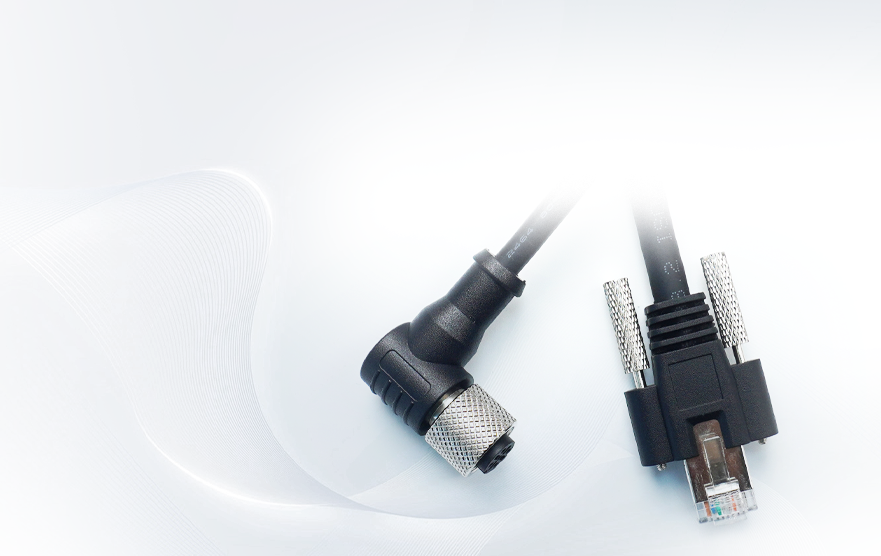
2 pin circular connector cables are electrical cables terminated with a circular connector that has two separate electrical contacts or “pins.” They are mainly used to carry either DC power or a simple two‑wire signal between devices. Because of their round shape and mechanical locking features, they are easier to mate, more robust, and often more resistant to dust, moisture, and vibration than many rectangular connectors.
In practical terms, whenever you need a simple two‑wire connection in a tough environment—such as powering a small device, connecting a sensor, or running a low‑voltage line—2 pin circular connector cables are a compact, reliable solution.
Key Features and Design Basics
Most 2 pin circular connectors share several common design characteristics that make them well‑suited to industrial and outdoor use:
Two conductors
As the name suggests, there are two separate pins (or sockets) inside the connector, intended for positive and negative power lines or a differential signal pair.
Circular housing
The connector body is round, which allows for 360‑degree sealing, robust overmolding, and easy alignment when plugging in and out.
Locking mechanism
Many 2 pin circular connectors use threaded couplings, bayonet locks, or push‑pull latches to ensure the cable cannot disconnect accidentally under vibration or mechanical shock.
Environmental sealing
Industrial and outdoor versions often carry IP67 or IP68 style sealing (dust‑tight and protected against immersion), with gaskets and O‑rings to keep moisture and contaminants out.
Cable strain relief
A clamp or overmold at the back of the connector relieves strain from the cable, preventing flexing from damaging the internal terminations.
Multiple termination styles
Depending on the product, terminations can be solder cups, screw terminals, crimp contacts, or pre‑molded cable assemblies.
These features combine to deliver a connection that is both electrically reliable and mechanically rugged, even when frequently mated and unmated.
Typical Applications of 2 Pin Circular Connectors
Because they are simple, robust, and easy to use, 2 pin circular connectors and cables show up in a wide range of use cases:
- Low‑voltage DC power distribution for small devices, LED lighting, and control modules
- Connecting industrial sensors, limit switches, and actuators over a two‑wire interface
- Power and trigger lines in factory automation and process control environments
- Battery connections in portable equipment, e‑bikes, and small mobility devices
- Harsh‑environment outdoor equipment such as access control systems, security cameras, and environmental monitoring stations
- Marine and automotive auxiliary wiring, where vibration and moisture resistance are important
In many of these applications, the main job of a 2 pin circular connector cable is to make maintenance and installation easier: devices can be unplugged and swapped quickly without cutting and re‑crimping wires, while still ensuring a safe, sealed connection.
Advantages Compared to Other Connector Types
When selecting an interconnect solution, you might wonder why a 2 pin circular connector is chosen instead of a rectangular plug, screw terminal, or simple inline splice. Some of the main advantages include:
Ruggedness and durability
Circular connectors distribute mechanical stress evenly around the shell, making them less prone to damage when pulled or twisted. The locking system also reduces wear on the contacts.
Ingress protection
With appropriate sealing, circular connectors can achieve high levels of protection against dust and water, making them suitable for outdoor and wash‑down environments.
Ease of mating
The circular form factor and keying features help users align and connect the plug quickly, even in low‑light or hard‑to‑reach locations.
Compact footprint
A 2 pin circular connector offers a small panel cutout and minimal space usage while still handling reasonable current and voltage.
Modularity and serviceability
Systems can be designed with junction points and enclosures that accept circular connectors, making upgrades, field replacements, or sensor swaps faster and cleaner.
Common Specifications to Consider
When choosing a 2 pin circular connector cable for a project, engineers and buyers should pay attention to several key specifications:
Current and voltage rating
Ensure the connector’s pin size, contact material, and insulation can safely handle the maximum continuous current and operating voltage in your system.
IP rating (environmental protection)
For outdoor or industrial use, look for IP67, IP68, or similar, indicating resistance to dust and water ingress.
Contact plating and resistance
Contacts are often plated with materials like tin or gold to reduce contact resistance and corrosion. Lower contact resistance helps minimize voltage drop and heating.
Cable diameter and conductor size
The connector should support the outer cable diameter (for proper sealing and strain relief) and the conductor gauge required by your current level and run length.
Operating temperature range
Industrial and automotive environments can see wide temperature swings, so make sure the connector materials and cable insulation remain stable and flexible within the expected range.
Mating cycles
If the connection will be frequently plugged and unplugged, check the rated number of mating cycles to ensure long service life.
Panel‑Mount and Inline 2 Pin Circular Connectors
2 pin circular connectors are available in different mechanical formats, allowing flexible system design.
Panel‑mount connectors
These are designed to be mounted on enclosures or panels, providing an interface between internal electronics and external cables. The inside may be soldered or wired directly to the PCB or harness, while the outside mates with a plug from the field. In many waterproof designs, a threaded bushing, nut, and sealing washer hold the connector in place and maintain the enclosure’s ingress protection rating.
Cable‑to‑cable (inline) connectors
Inline connectors join two cables together, enabling modular harnesses or extensions. A typical configuration uses a plug on one cable and a receptacle on the other, both with strain relief and environmental sealing.
This flexibility allows designers to plan connection points strategically—for example, at the wall of a waterproof box or along a long run of wiring where field service might be required.
Best Practices for Selecting the Right 2 Pin Circular Connector Cable
To choose the best 2 pin circular connector cable for your application, follow these practical steps:
Define the electrical requirements
- Maximum current, voltage, and whether the line carries power or signal
- Acceptable voltage drop and conductor gauge needed
Assess the environment
- Indoor vs. outdoor, exposure to dust, water, chemicals, or UV
- Expected temperature extremes and mechanical vibration
Decide on mounting style
- Panel‑mount vs. inline, right‑angle vs. straight, bulkhead requirements
- Space constraints around the connector
Choose the locking and sealing style
- Threaded, bayonet, or push‑pull based on how often the connector is accessed
- Required IP rating and sealing accessories (gaskets, caps)
Consider installation and maintenance
- Preference for solder, crimp, or screw terminations
- Need for field‑installable connectors versus fully molded cable assemblies
Plan for future scalability
- Possible need to standardize on a connector family for other pin counts
- Availability of compatible mating parts and replacement cables
By working through these points systematically, you reduce the risk of under‑specifying a connector and encountering reliability issues later in the product’s life cycle.
Implementation Tips and Common Mistakes to Avoid
When deploying 2 pin circular connector cables in a real project, keep these tips in mind:
- Route cables to minimize sharp bends right at the connector, even if strain relief is present.
- Use protective caps on unused panel‑mount connectors to maintain sealing and prevent corrosion.
- Match cable outer diameter to the connector’s gland range to ensure effective sealing and strain relief.
- Avoid mixing connectors that look similar but have different keying or pin assignments—standardize part numbers and clearly label cables.
- In high‑current applications, verify that the connector’s temperature rise at full load is acceptable within the enclosure.
A common mistake is to select a connector purely on physical fit without considering environmental protection or long‑term durability, which can lead to intermittent faults that are difficult to troubleshoot.
Conclusion
2 pin circular connector cables offer a robust, compact, and easy‑to‑use way to connect power or simple two‑wire signals, especially in industrial, outdoor, and mobile applications. By understanding their key features, specifications, and best‑practice selection criteria, you can design interconnects that are safer, more reliable, and easier to maintain over the entire life of your system.

Apply Here For A Custom Made Solution

Shenzhen Torvenics Electronic Co.,Ltd.
615 Block A, No.11 Tangkeng Road,Henggang Longgang Dist,Shenzhen China